

November 2026
Fabulously Fancy Fragments
Previews that look like they belong, appear almost instantly, never block Emacs, and update as you type
In July 2021 I was thrilled to announce the long-awaited feature of citation syntax. Today I get to announce a feature a bit closer to my heart, a dramatic improvement to (actually a complete overhaul of) Org’s system for generating LaTeX previews!

In late 2021, Karthik and I discussed our mutual dissatisfaction with the status quo, and in 2022 we embarked on a project to improve the experience by ripping out the entire LaTeX preview implementation, and building something better in its place. What started as a “brief” collaborative project has turned into a multi-year slog with a long tail of annoying issues, but after exchanging a bit over ten thousand messages and working on it for a few hundred hours, I think it’s fair to say we’ve succeeded.
Let me give you a tour of the new work; if you’re interested in reading more of the details, see Karthik’s companion post Understanding Org’s LaTeX preview system.
The Status Quo
Many Org users are intimately familiar with LaTeX, and appreciate the close integration of LaTeX snippets in the Org syntax. I was one of the many mathematics students inspired by Gilles Castel’s fantastic blog post demonstrating his system for quick LaTeX snippets, and my quest to replicate the experience in Emacs and produce detailed notes led to my intimate acquaintance with the particularities of Org’s LaTeX preview system, namely:
- Every fragment is compiled individually in a fresh LaTeX process
- Fragments are compiled sequentially, and block until all are complete
- A file with #+startup: latexpreview will typically freeze Emacs for \(n(\text{fragments}) \times \frac{1}{4}\) seconds
- There is a very loose connection between in-buffer text size and preview size
- The baseline never matches
- Colours are fixed at generation time, and so a theme change requires clearing + regenerating all fragments
- LaTeX errors (like \(1+1\foobar\)) are silently hidden
Over the years other people have tried to improve the experience with config band-aids and packages that try to work around aspects of the design (most notably org-fragtog and xenops). All of these approaches made severe compromises. Karthik wasn’t happy with the status quo, and started showing you could make better compromises; I didn’t like making compromises. So, we ended up throwing out the old implementation and starting from scratch 💥.
Shiny new features
Fragmented (async) generation
For LaTeX fragments to feel like an ambient part of the Org buffer, there are a few crucial things we need to get right. One of the most important is making sure that they never interrupt your interaction with the buffer.
It is not at all pleasant for Emacs to freeze when opening a buffer, or with a package like org-fragtog, while typing. To prevent this from happening we’ve split the rendering pipeline up and execute every stage of it asynchronously, with bookkeeping to make sure we put the right overlay images in the right place, even when the buffer’s changed during fragment generation.
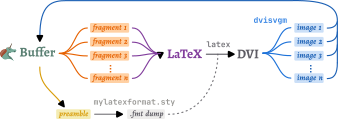
Karthik and I have done an extensive amount of profiling and tuning to minimise pauses during the pipeline to make sure you never feel Emacs hitch during preview generation.
Fast fragments
Now, while it’s nice for fragment previews to no longer hold up interacting with your Org buffer, it’s also nice to see them quickly. We now go to great lengths to minimise the time it takes to see previews placed in the buffer. Details aside, a moderately mathematical document holding 660 fragments that used to take two and a half minutes to load now takes two seconds. In fact, the difference is even more pronounced as we order fragment generation based on the current buffer position, so you see nearby fragments stream in first.
This new pipeline is built using org-async, a small declarative process-chaining library introduced as part of the patch set.
We also make use of org-persist to cache fragments, which means that this ∼70×
performance improvement is the worst case. The fragments in a re-opened buffer
should appear near-instantly (see org-latex-preview-cache and adjust
org-latex-preview-persist-expiry to change how long old previews are kept for).
Fitting in with a splash of colour
A particular pet peeve of mine has been that previewed fragments never quite
looked at home in the Org buffer. The sizing was always a bit off, the
positioning not quite right. We now collect the sizing information needed to
harmonise the size of fragments’ images with the buffer’s text, producing
perfect baseline alignment and matched sizing (depending on your LaTeX/Emacs
font pairing, a minor correction may be needed; see
org-latex-preview-appearance-options).


If you’re wondering how much work this took to calibrate, just know that there’s an unexplained 1.659393% correction factor needed to align the calculated and observed sizing.
These fragments also follow the text scale and the current theme’s foreground colour, helping them feel like part of the buffer’s text.

Live updating too!
As part of the reworked preview engine, we wanted to subsume the functionality
of org-fragtog, a package for intelligently toggling previews as you move into
and out of them. This is provided with a new minor mode, org-latex-preview-mode.
Thanks to the speed of the new pipeline, we realised that we could not just
re-render an edited fragment rapidly, but re-render it during editing. When
org-latex-preview-mode-display-live is non-nil, the preview mode also shows
live-updating previews.

This can be particularly helpful for catching mistakes early, since we now also indicate errors by applying the error face and putting the compilation log for the fragment in a tooltip.

\sqrt tints the preview red, with LaTeX's error on hover.
Nicely numbered
Previously, every numbered equation was compiled in isolation, and so rendered as (1). With the work we’ve done on tracking fragments across the buffer, I couldn’t resist the temptation to make equation numbering actually correspond to equation order.

Equitable exports
The improvements in preview generation speed and sizing have been carried through to the export backends. In particular, html and odt (via a new ox-mathml library) exports get the same numbered, aligned, and coloured images.
Caveats
While I said earlier that I didn’t want to make any compromises in the preview experience, unfortunately it hasn’t been possible to enable that experience in all configurations. In particular:
- Live previews need \\(...\\) / \\[...\\], since $ is ambiguous while typing
- XeLaTeX and LuaLaTeX can’t use precompiled preambles, so they’re noticeably slower than pdfLaTeX
Getting it early
This overhaul will be part of the Org 10.0 release. Until then, you can get the shiny new goodness from the main branch (and help iron out the long tail of bugs!). If you’ve been enjoying org-fragtog, you can drop it in favour of the new org-latex-preview-mode.
For the best experience, make sure you have mylatexformat.sty and preview.sty installed as part of your LaTeX distribution, along with dvisvgm 3.1+ or dvipng.
In the future, you might even see this work be reused to bring previews to other
modes like calc 😉
Thanks
This has been one of the longest-running and most ambitious Org contributions I’ve been part of, and seeing it finally land is enormously satisfying.
A huge thank you to Karthik for going through this process with me, the pair-coding calls we’ve shared, and the heroic last-mile push to solve the last few issues blocking the merge. Ihor has also been fantastically patient with the review and integration process, and helped fix bugs we discovered in other parts of Org (mostly org-persist) along the way.
The community of beta testers has been exemplary, providing a steady stream of bug reports and encouragement. It’s been a joy to read messages like Rudolf’s:
omg! omg! omg! So, this new system not only fixes the baseline problem, making LaTeX actually usable in html exports, but it also makes TikZ work?! No more fiddling with LaTeX Org Babel? No more per-image scaling headaches? Now, that is incredible!